

In this article you'll learn...
- How to build instrumentals using a simple layering philosophy.
- The process of mapping song structures with a reference song.
- A workflow for creating drums, chord progressions, and basslines.
- How to turn a simple loop into a full song arrangement.
- Ways to improve your instrumentals with sound selection and transitions.
- A mixing process to achieve better balance and clarity.
The mystery of music production
For many artists, music production feels mysterious.
You open a DAW (Digital Audio Workstation — music production software), see hundreds of sounds and plugins, and suddenly it feels like you need years of technical training just to get started.
Let’s demystify this.
Music production can look complicated at first, but instrumentals are simply built layer by layer.
When you combine those layers, you end up with a complete piece of music.
Beatmaking vs. music production
When people talk about producing music today, they often mean making beats inside a DAW.
But music production actually includes several stages:
- composing music
- recording vocals or instruments
- editing performances
- arranging the song
- mixing and mastering
In this guide, we’ll focus on the stages that apply to creating a finished instrumental.
Later stages, like recording vocals, refining lyrics, and full mixing can be learned once you’re comfortable creating the musical foundation.
How to start making beats
If you’re new to producing, the easiest way to begin is to focus on the core elements that make up most modern instrumentals.
You don’t need to understand advanced music theory or complicated mixing techniques right away. What matters is learning how a beat is built.
Learning music production takes time, but you don’t need years of experience before you can start making usable music. With consistent practice, you can create high quality instrumentals within a few months.
The music production formula
A reliable workflow for building an instrumental from start to finish:
Step 1: Choose a reference track
While you may have already thought of the instrumental concept, it helps to choose a reference track before you start. This is a common practice used when producing music.
A reference track is an existing song you want to loosely model your instrumental after. Not to copy the song, but to inform decisions about structure, energy, and sound.
Referencing helps with things like:
- Song structure
- Tempo and BPM
- Drum style
- Instrument selection
- Transition timing
- Arrangement pacing
It acts as a blueprint for the beat. Your final instrumental may sound inspired by the reference track, but shouldn’t sound exactly like the reference.
A modern reference workflow
Instead of only listening to the reference track, it’s better to import it directly into your DAW so you can map out the structure.
Throughout this article, I’m using FL Studio, the DAW I personally produce music with. The interface will look different if you use software like Logic Pro or Ableton, but the overall workflow is the same.
For example, you might:
- Purchase or download the reference track as an MP3 (via a source like Apple Music)
- Import it into your DAW.
- Mark the song sections directly in the playlist while listening to it.
This makes it much easier to build your own beat and have it sound professional.
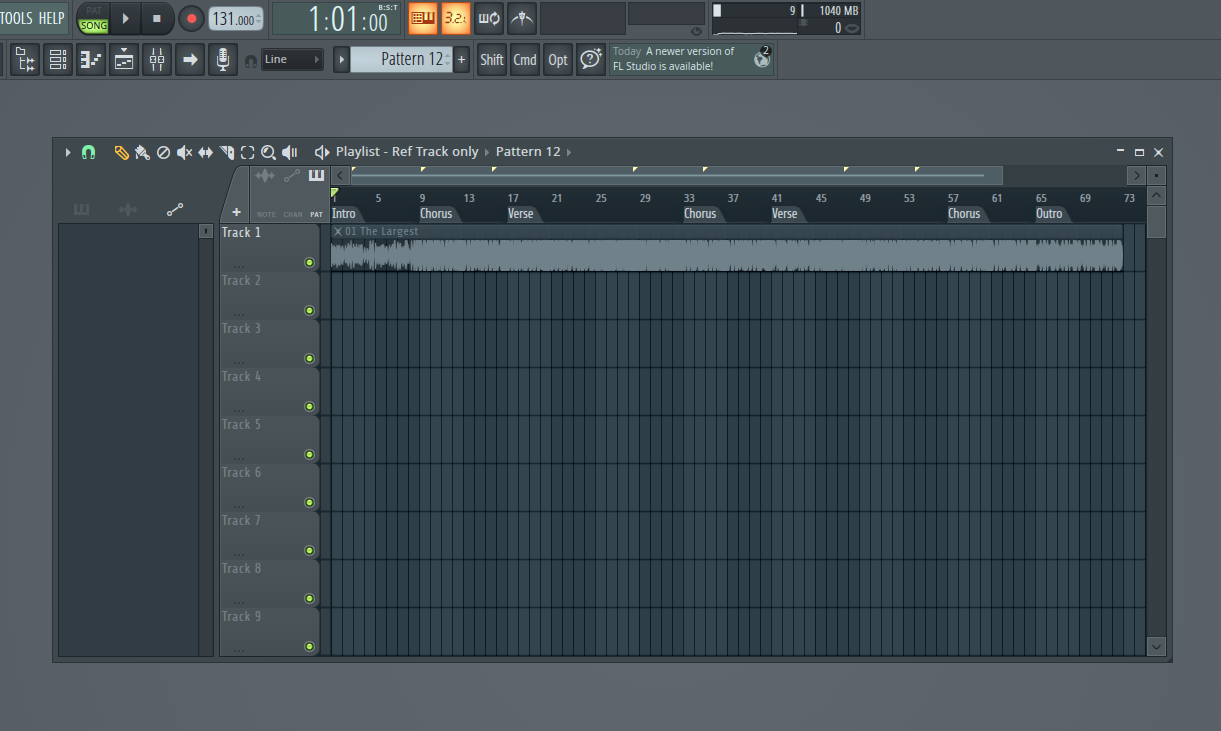
Reference track
Here's the reference track I used.
Step 2: Build the drum foundation
Drums are rhythmic foundation of an instrumental.
Your goal at this stage is to build a groove that captures the rhythm and feel of your reference track. In many genres, drum patterns are intentionally similar across songs.
Most drum patterns are built from a few core sounds that each play a different role in the groove:
- Kick – the low drum that provides the main pulse and weight of the beat
- Snare or clap – the backbeat, usually hitting on the second and fourth step of the rhythm pattern.
- Hi-hats – faster rhythmic elements that add movement and groove
- Percussion – additional sounds like shakers, rims, or fills that add variation and texture
There are multiple ways you can program drums inside a DAW.
Method 1: Channel Rack step sequencing
In FL Studio, one way of programming drums is to start off with the Channel Rack.
This approach uses a step sequencer where you toggle drum hits on or off across the grid.
Many DAWs offer a similar step-based way to program drums, although the interface and naming may differ.
It’s fast and great for simple rhythms. Beginners often find this the easiest way to start building a beat.

Basic drum loop
Method 2: Piano Roll programming
Another common approach is programming drums in the piano roll.
Instead of toggling steps, you place drum hits as notes across the timeline.
This gives you more control over:
- timing
- velocity
- groove
- swing
Personally, I prefer starting drum loops this way.
I either sketch the drum pattern in the piano roll or record the drum parts using a pad controller (like Maschine MK3) and then edit them afterward.
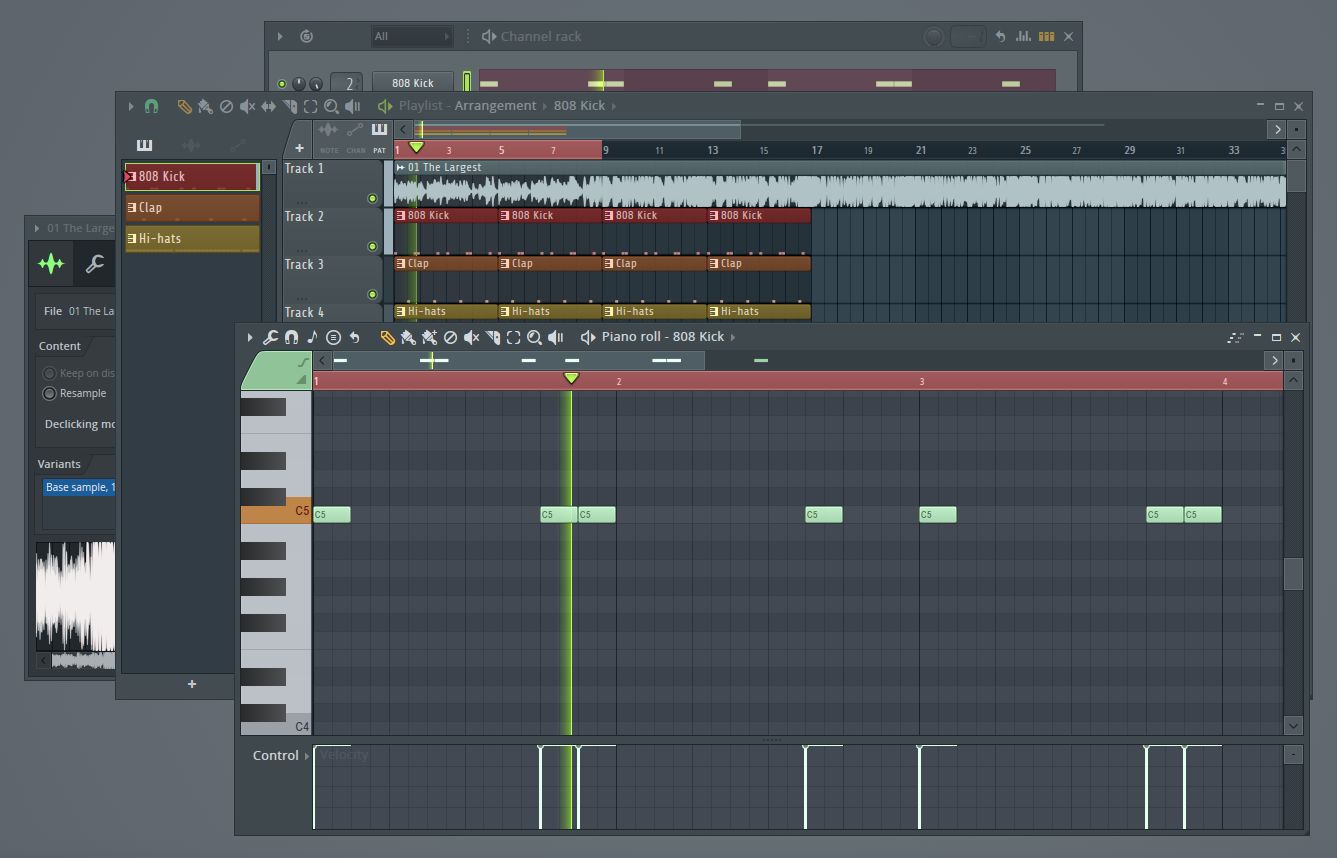
Method 3: Audio samples directly in the playlist
Another common production workflow is to place audio samples directly in the playlist instead of programming them in a drum sequencer.
In this approach, you’d find a drum loop or individual drum sounds and drag them onto the timeline to arrange them.
This method works especially well for:
- unique percussion sounds
- drum fills
- one-shot accents
- texture layers
Alternatively, you can start off with Method 2 (piano roll programming) and then convert the patterns into audio files.
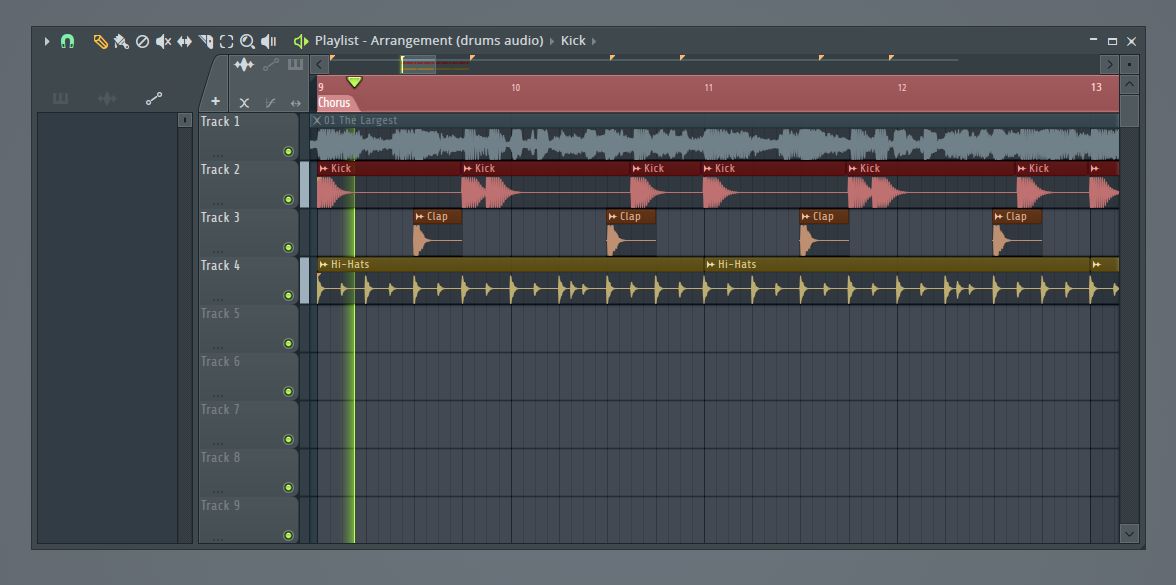
Drum loop
Step 3: Add a chord progression
Chord progressions give your beat its harmonic foundation.
A chord is a group of notes played together (ex. C, E and G). These notes typically come from the same musical scale, which is what makes them sound harmonious rather than random.
To get started with chords, repeat two or three chords from a chord progression. Check out these popular chord progressions for some ideas.
You can play chords using instruments like:
- Piano
- Electric piano
- Synth pads
- Guitar
- Strings
You can create chords in several ways:
- Playing them on a MIDI keyboard
- Drawing notes directly in the piano roll
- Using chord presets or scale helpers built into many plugins
Many modern DAWs and virtual instruments even allow you to trigger full chords by pressing a single key on the piano roll / keyboard.
Don’t worry if you don’t know music theory yet. Focus on experimenting until you find a combination of notes that creates the mood you want.
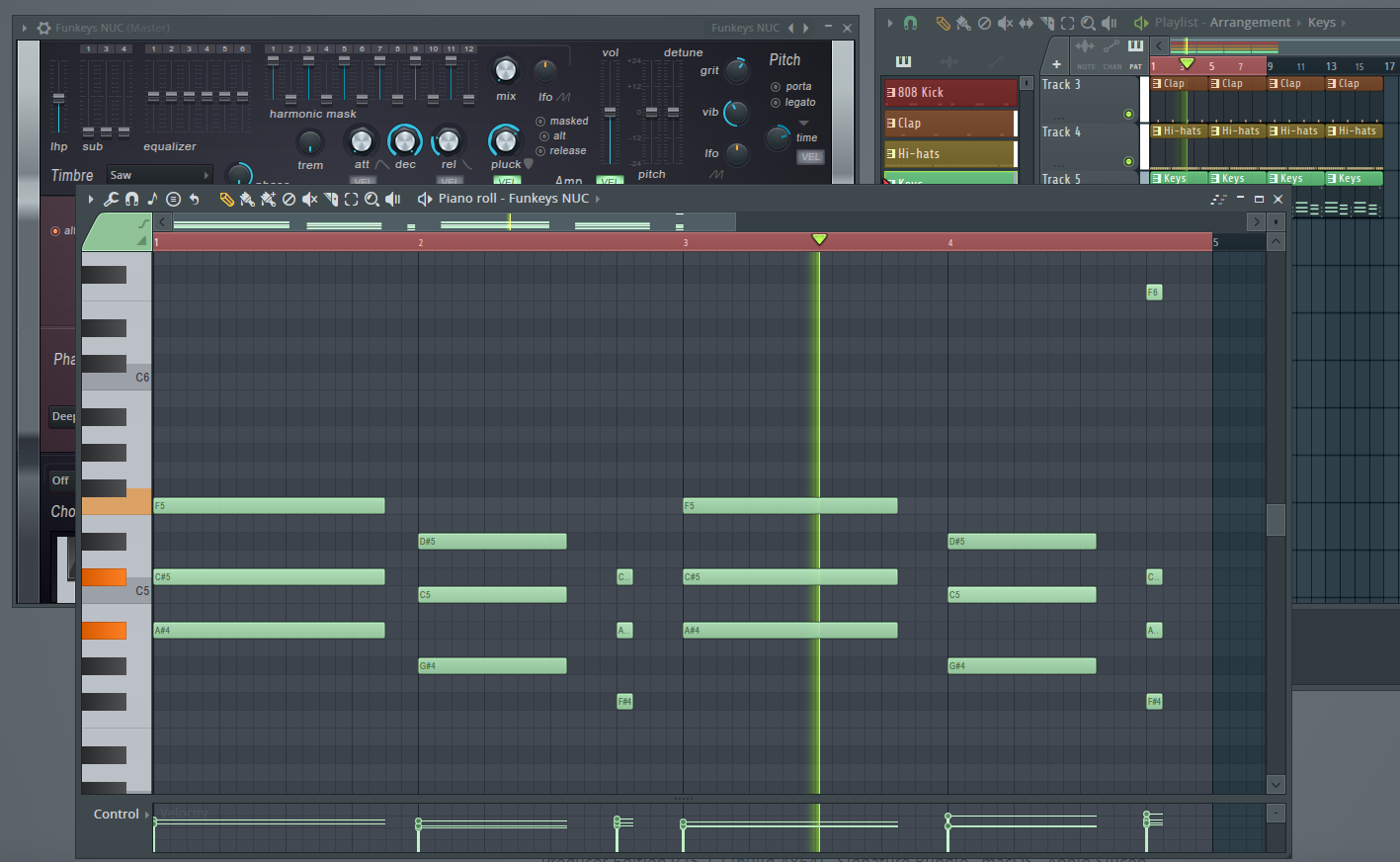
Chord progression
Step 4: Add bass
The bass connects rhythm and harmony.
It reinforces the chord progression while adding depth and weight to the beat.
Most modern productions include a dedicated low-frequency layer that sits underneath the rest of the instrumental.
This might be:
- a synth bass
- a sub bass
- an electric bass guitar
In hip-hop and many modern pop styles, producers often use 808-style bass sounds. These low-pitched drum hits often double as the track’s bassline, providing both rhythm and deep low-end.
However, the exact sound can vary widely depending on the genre and mood.
Start simple
A reliable starting point is to have the bass follow the root notes of your chords.
The root note is simply the note that names the chord. For example, the root of a C major chord is C.
For example, imagine a chord progression like:
C major → A minor → F major → G major
Your bass can play the notes:
C → A → F → G
The bass can repeat these notes in a simple pattern that fits the groove. This keeps the bass locked to the harmony while creating a strong connection between the harmonic layer (chords) and the rhythmic layer (drums).
For now, avoid making the bass too busy. In many modern tracks, a simple repeating bass pattern works better than something overly complex.
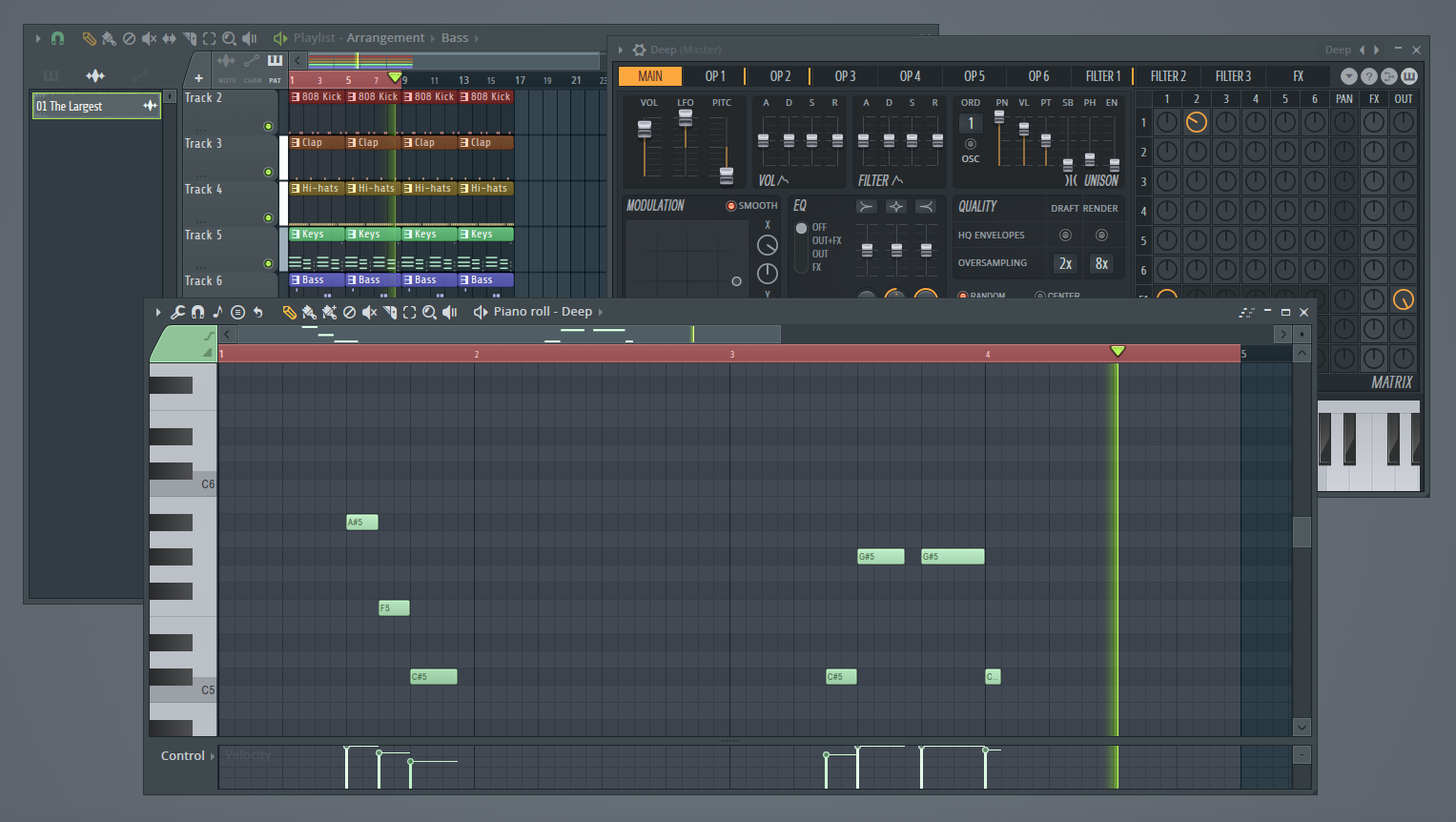
Bass
Step 5: Create the main melody
The melody is often the most recognizable element.
At this stage, you’re adding a lead idea that sits on top of the drums, bass, and chords.
A melody might come from:
- a synth lead
- a guitar line
- a piano riff
- a vocal sample
- a chopped sample
If you’re not sure where to start, try one of these simple approaches:
-
Start with notes from your chords.
Try picking one or two notes from the chords you already added and turning them into a short repeating phrase. -
Start with a simple rhythm.
A repeating pattern of 3–5 notes often works better than something complicated. -
Leave space between phrases.
Small pauses make the melody easier to remember and give the beat room to breathe.
You can experiment with several melody ideas before landing on the right one.
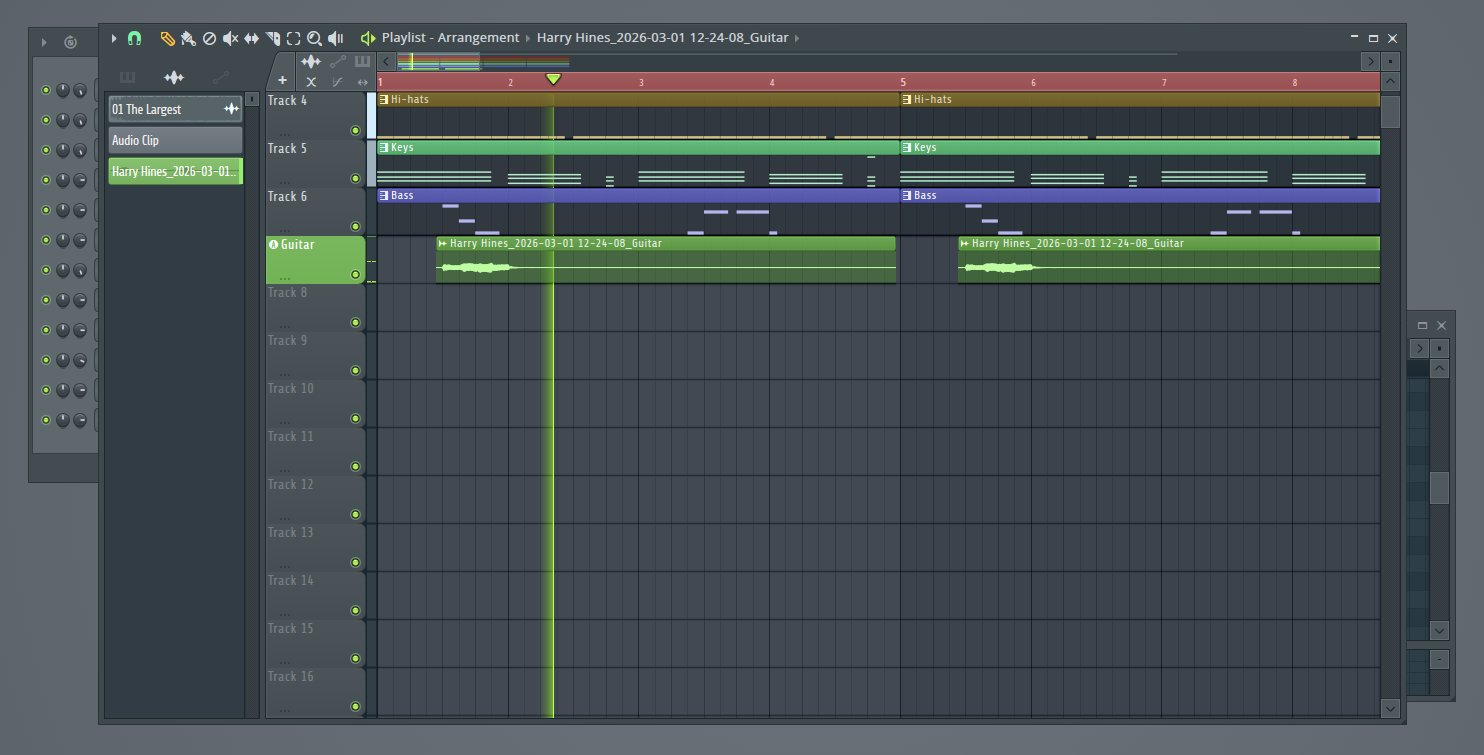
Main melody
Step 6: Arrangement
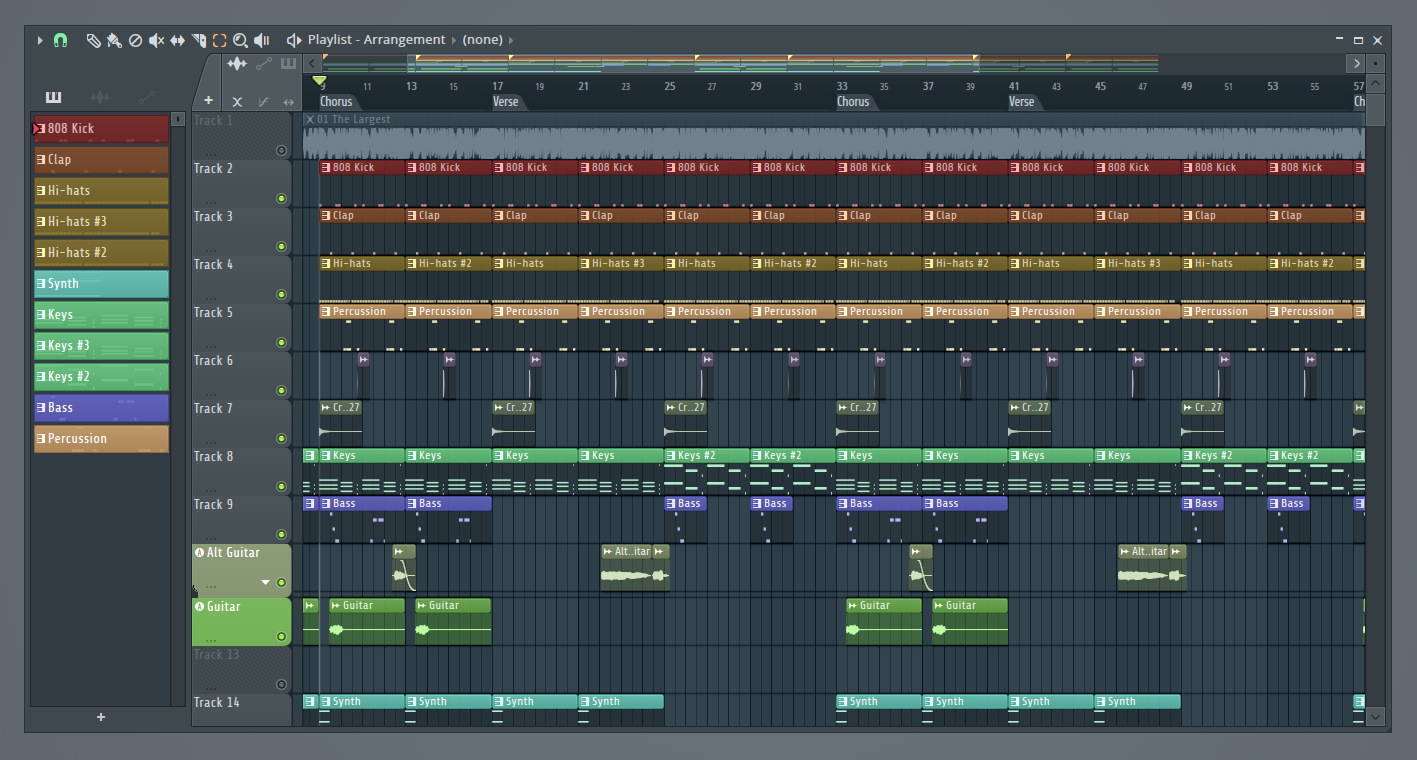
Once you have the main elements of your beat (drums, chords, bass, and melody) the next step is arranging them into a full song.
In your DAW’s playlist or arrangement view, you can duplicate patterns and place them across the timeline to build these sections (intro, verse, chorus, etc.).
A simple way to start arranging is to gradually add and remove elements:
- Begin with fewer instruments in the intro
- Introduce more layers as the song develops
- Bring in the full beat for high-energy sections like the chorus
- Remove or swap elements occasionally to keep the track evolving
Even small changes like muting drums for a moment, adding a guitar layer, or changing the hi-hat pattern, can make the arrangement feel more dynamic.
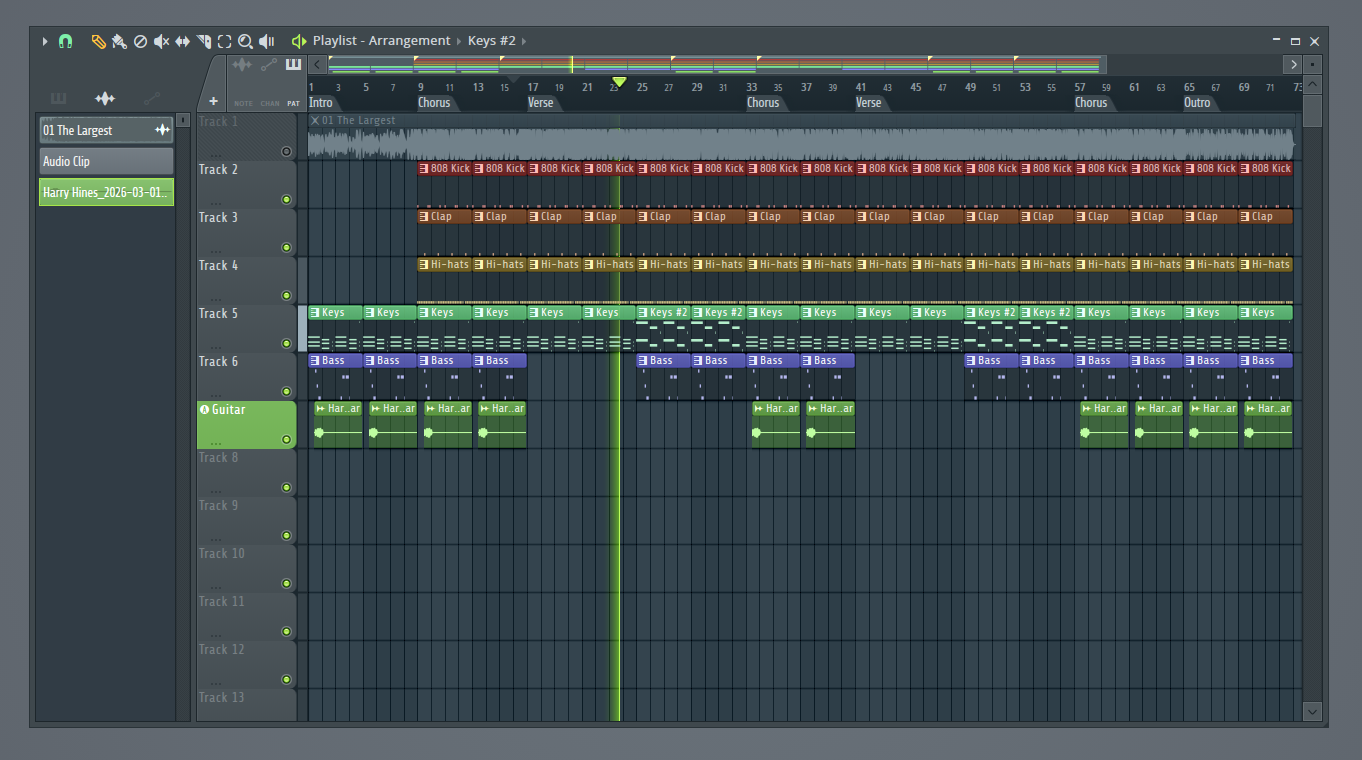
Arranged track
Step 7: Focus on sound selection
Sound selection is one of the biggest factors separating amateur beats from professional sounding productions. Two producers can play the exact same notes and end up with completely different results simply because they chose different sounds.
Strong sound selection means choosing instruments that naturally work well together. Weak sound selection often leads to muddy mixes and cluttered arrangements.
If the sounds already fit together well, mixing becomes dramatically easier later.
Make sure your main instrument actually sounds good
By this point you probably already have a melody or chord progression playing.
Now listen carefully to the actual sound you chose.
If the core instrument doesn’t fit well with the rest of the beat, the whole production can feel off. Try cycling through a few presets and notice how the exact same melody or chords can sound wildly different.
It’s normal to audition several sounds before committing to one.
Once the core sounds feel right, small additions like percussion accents or occasional synth hits can further enhance the instrumental.
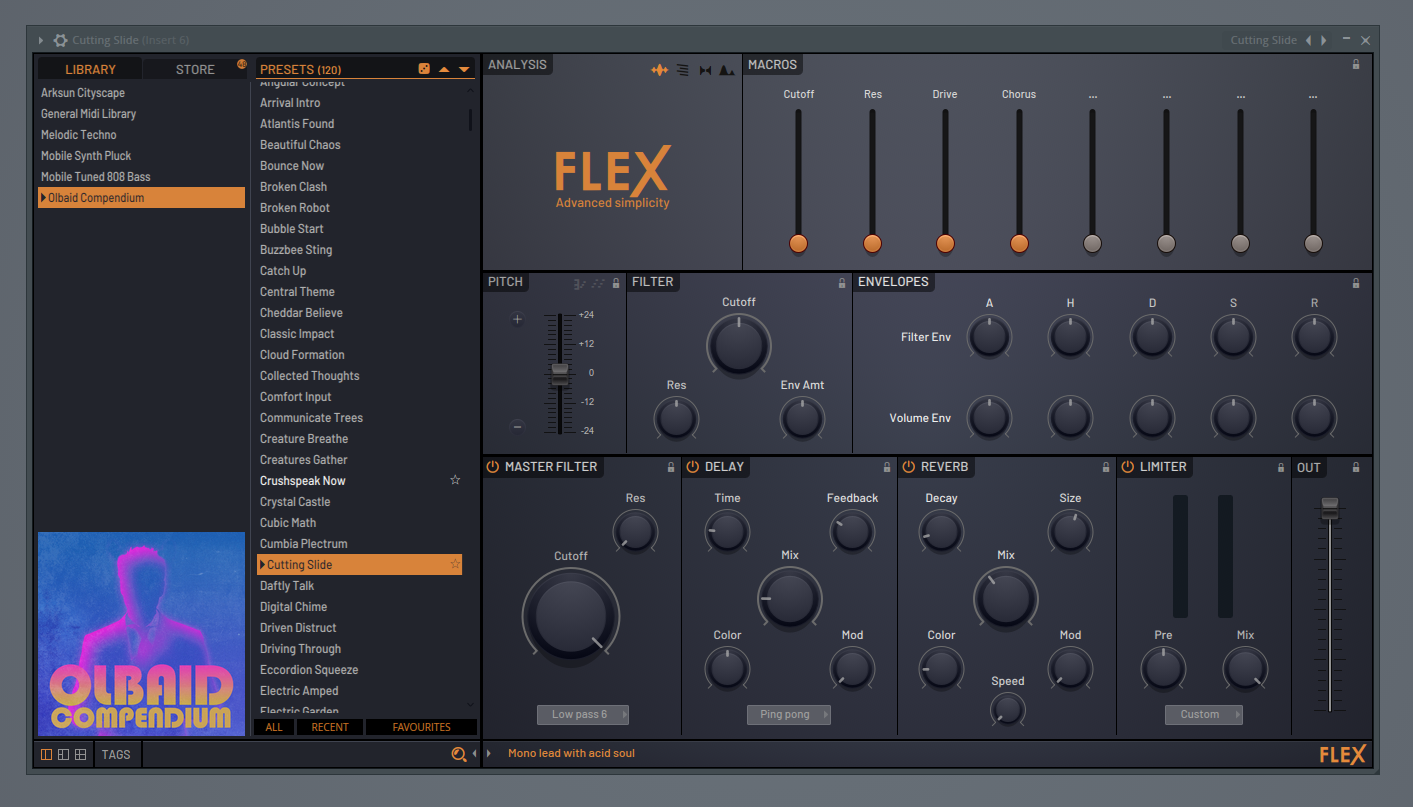
Enhancing the track with complementary sounds
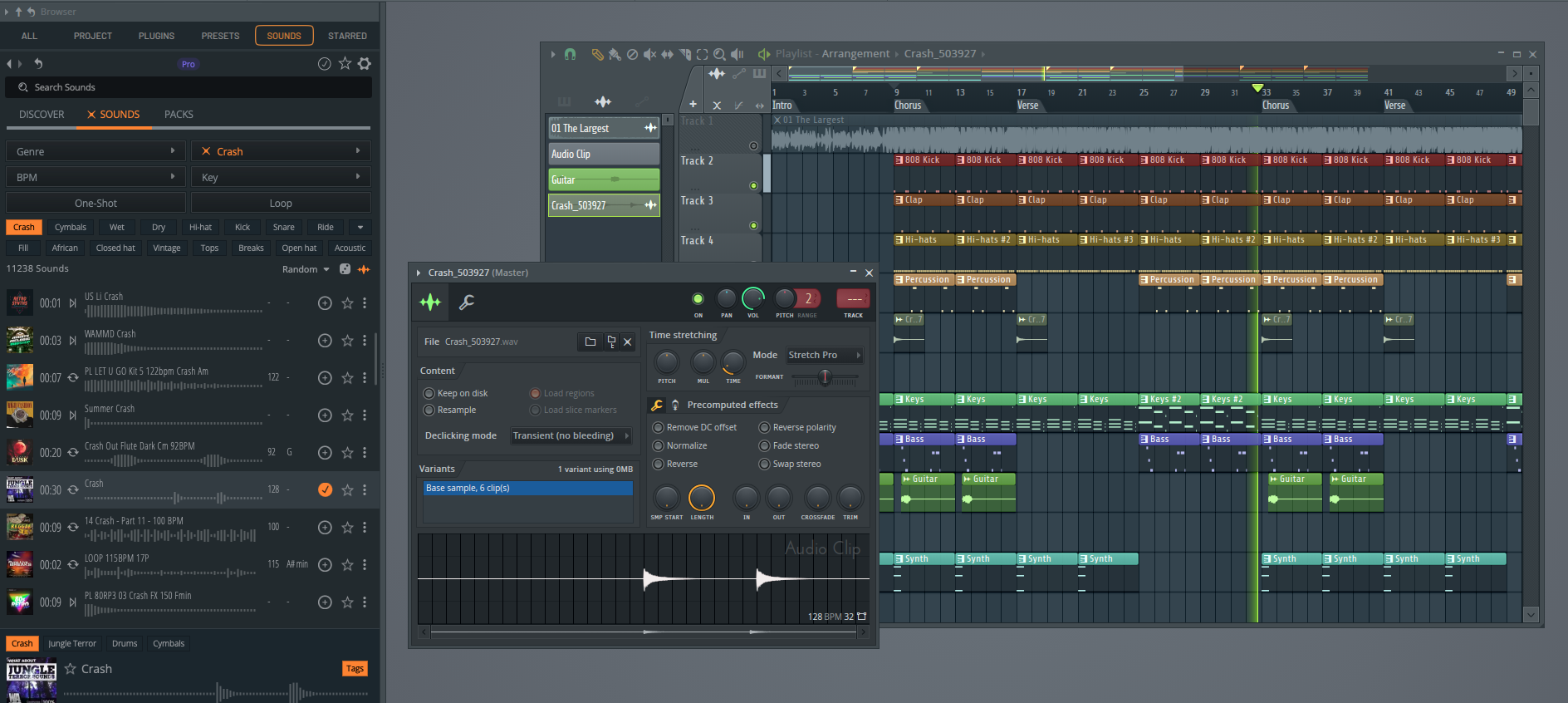
Step 8: Add transitions
Transitions help guide the listener from one section of the instrumental to the next.
Without them, a beat can feel abrupt when it jumps between parts like the verse and chorus.
Transitions aren’t just special effects. They can come from sound design, arrangement changes, or small shifts in energy within the beat.
Some common transition techniques include:
- Risers or FX sweeps that build tension before the next section.
- Reverse cymbals or impacts that lead into a drop.
- Drum fills near the end of a section.
- Dropping certain sounds out briefly right before the next part begins.
- Introducing a new melody or instrument to signal a change in energy.
For example, you might remove the drums for the last half bar of a verse before the chorus hits. That small moment of space makes the next section feel bigger and more intentional.
Another common technique is letting a riser build for one or two bars before a drop. Even subtle effects like this can guide the listener naturally from one section to the next.
The goal is simple: help the listener feel the change coming, rather than having the beat jump abruptly between sections.
Transitions
Step 9: Refinement
Refining the beat
Once the core musical elements are in place, take a step back and listen to the instrumental as a whole.
This stage is about polishing the production.
Instead of adding entirely new ideas, focus on small adjustments.
Some common refinement tasks include:
- Removing sounds that clutter the mix or distract from the main idea
- Adjusting patterns so sections feel more dynamic
- Tweaking the arrangement so instruments enter and exit at the right moments
- Adding subtle details like percussion hits or background textures
- Making small level adjustments so key elements stand out
Strong productions usually come from intentional choices, not just adding more sounds.
Sometimes the best move is removing a sound that isn’t contributing much. Other times it might mean adding a small detail that strengthens the arrangement.
Organizing your project
Refinement also includes cleaning up your project so it’s easier to work with.
This might mean:
- Deleting unused tracks or audio clips.
- Organizing patterns in the playlist.
- Color-coding instruments or sections.
A clean session makes mixing, collaboration, and future edits much easier.
Step 10: Mixing your instrumental
Once the musical elements are in place, it’s time to mix your instrumental. Mixing is the process of balancing the sounds so everything sits clearly together.
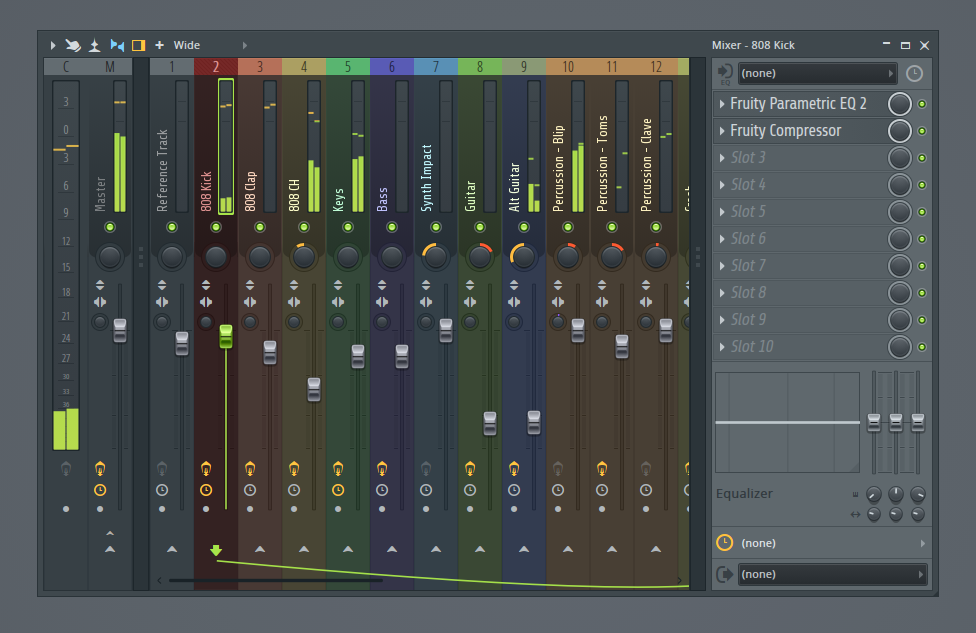
Route your tracks to the mixer
In most DAWs, each instrument or audio track should be routed to its own mixer channel.
For example, you might have separate mixer channels for:
- Kick
- Snare or clap
- Hi-hats
- Bass
- Keys
- Lead melodies
Routing sounds to mixer channels gives you the ability to adjust levels, add EQ, apply compression, and shape the overall balance of the track.
Once everything is routed properly, you can begin making mixing adjustments.
Some of the most important mixing concepts include:
- Volume balancing
- EQ (frequency shaping)
- Compression (dynamic control)
- Panning (stereo placement)
- Reverb and delay (depth and space)
Good mixing does not necessarily require complex plugins.
In many cases, simply adjusting levels and removing frequency conflicts with EQ can dramatically improve clarity.
A simple way to approach mixing
Start with a few basic steps rather than trying to apply every concept at once.
-
Start with volume balancing
Lower all tracks, then gradually bring them up so the important elements (kick, snare, melody) sit clearly in the mix. -
Use EQ to reduce conflicts
If two sounds feel muddy together, use EQ to remove unnecessary low or mid frequencies from one of them. -
Use panning to create space
Keep core elements like kick, snare, and bass centered. Pan supporting sounds slightly left or right to widen the mix. -
Add compression if needed
Compression can help control volume spikes and make sounds feel more consistent. -
Use reverb and delay sparingly
These effects add depth, but too much can quickly make a mix feel washed out.
Check your mix on different speakers
Before finalizing your instrumental, listen to it on multiple systems.
Try playing it through:
- studio headphones
- earbuds
- laptop speakers
- car speakers
Even small adjustments across each track can have a dramatic impact on the audio quality.
Also, alternate listening to your instrumental and the reference track. While your track may not sound as polished as the reference (especially as a beginner producer) it’s still a helpful measuring stick.
Full track (mix comparison)
Essential music production tools
You don’t need a “state of the art” recording studio to start producing music, but you do need a few essential tools.
At minimum, start with three things:
-
DAW (Digital Audio Workstation)
Your DAW is the main tool used to create beats and arrange songs. Popular options include FL Studio, Ableton Live, Logic Pro, and Studio One.
Most DAWs also include built-in instruments, effects, and mixing tools like EQ, compression, and reverb, so you can start producing music without buying additional plugins.
Most modern laptops or desktops can run a DAW. You don’t need an extremely powerful computer to get started.
-
Headphones
You need a reliable way to hear what you’re creating. Start with studio headphones since they’re affordable and don’t require treating a room.
As you progress, you may eventually add studio monitors (speakers) for a more accurate listening environment.
-
Sounds and Instruments
Beats are built using drum samples, instrument plugins (VSTs), and sound libraries. Most DAWs include plenty of starter sounds to get you going.
As you improve, you may eventually explore additional sample packs or plugins to expand your sound palette.
Final thoughts
Producing your own music is a skill that improves through repetition.
The more songs you build, the more comfortable you’ll become with selecting sounds, arranging sections, and shaping the overall structure.
Focus on finishing songs rather than making everything perfect. Each completed beat teaches you something about rhythm, harmony, and arrangement.
Once your instrumental is finished, export it as a WAV file so it’s ready for writing, collaboration, or recording vocals.
If you plan to collaborate with other producers or engineers, you can also export stems (separate WAV files for each track) so the song can be mixed or arranged more easily later.
From there, you can continue developing the song by refining lyrics, recording vocals, or collaborating with other artists.
Over time, you’ll start to develop your own workflow, sound selection instincts, and production style.
After that, it’s just a matter of sticking with it.